
English
- English
- Español
- SaudiArabia
News

Detailed Introduction to FTTH (Fiber to the Home): Full Link Solution from Optical Cable to ONU
2025-08-11 15:48:29
Click:
“
Detailed Introduction to FTTH (Fiber to the Home): Full Link Solution from Optic
”
Detailed Introduction to FTTH (Fiber to the Home): Full Link Solution from Optical Cable to ONU
FTTH technology, compliant with ITU-T G.984 for GPON and IEEE 802.3 for Ethernet, delivers high-speed broadband with up to 10 Gbps symmetrical bandwidth, low latency (<1 ms), and scalability for IoT and cloud services. This article outlines the FTTH component chain—optical cables, dome-type splice closures, fiber distribution boxes, fiber optic wall outlets, and ONUs—within a PON framework, emphasizing compliance with international standards (ITU-T G.652/G.657, TIA/EIA) and practical deployment strategies for diverse environments.
As the demand for internet connectivity continues to surge, FTTH (Fiber to the Home) technology has emerged as the optimal solution for delivering high-speed broadband access, compliant with standards like ITU-T G.984 for GPON and IEEE 802.3 for Ethernet interfaces. By replacing traditional copper cables with optical fibers, FTTH not only enhances network bandwidth (up to 10 Gbps symmetrical in XG-PON) but also ensures transmission stability, low latency (<1 ms), and scalability for IoT, VR/AR, and cloud services. This article provides a comprehensive overview of each component in the FTTH solution, encompassing optical cables, dome-type splice closures, fiber distribution boxes, fiber optic wall outlets, and ONUs (Optical Network Units), within a Passive Optical Network (PON) framework. Particular emphasis is placed on the HUALUE brand's advantages and contributions, which align with best practices for reliability and upgradability. Additionally, practical suggestions for FTTH deployment are included, drawing from lessons on planning, environmental adaptation, and cost optimization.
1. Optical Cable: The Foundation of FTTH Networks

The optical cable serves as the fundamental element in FTTH networks, responsible for signal transmission from the central office (CO) or optical line terminal (OLT) to the end-user premises. Optical fibers offer low attenuation (typically<0.2 dB/km at 1550 nm), high bandwidth, and immunity to electromagnetic interference, making them ideal for PON architectures where signals are split among 32-64 users.
HUALUE brand optical cables utilize premium single-mode fiber materials compliant with ITU-T G.652 for standard applications or G.657 for bend-insensitive designs, ensuring low insertion loss (<0.3 dB) and high transmission efficiency. These cables are available in various specifications, including single-mode fiber (SMF) and multi-mode fiber (MMF), with options like figure-8 aerial cables or armored underground variants to accommodate diverse deployment scenarios (e.g., urban conduits, suburban aerial poles, rural long-reach up to 60 km) and bandwidth requirements. HUALUE's high reliability, with environmental ratings per Telcordia GR-20, enables stable performance across conditions, supporting GPON (2.5G/1.25G) or upgrades to 10G PON without wavelength conflicts.
Deployment Suggestion: Conduct a site survey to assess soil types (e.g., rocky for armored cables) and existing infrastructure; use prefabricated cables to minimize field splicing and reduce costs by 20-30%. For rural areas, opt for long-reach GPON with spare fibers for future expansion.
2. Dome-Type Splice Closure: Ensuring Fiber Connection Security and Stability

The dome-type splice closure (fiber optic splice enclosure) is designed for fiber splicing and protection in PON midpoints, safeguarding integrity while maintaining low-loss splices (e.g.,<0.1 dB per splice) and accommodating splitters for cascaded architectures. It is typically installed at access nodes, compliant with TIA/EIA-455 for testing.
HUALUE's dome-type splice closures are constructed from waterproof (IP68-rated), UV-resistant, and high-temperature-tolerant materials, suitable for outdoor and harsh environments per OSHA safety guidelines. The internal architecture supports precise fusion splicing, midspan access for daisy-chaining, and integrated splitter trays, effectively mitigating moisture, dust, and mechanical stress. HUALUE's modular design facilitates maintenance, scalability (e.g., up to 144 fibers), and compliance with NEC Article 770 for fire protection.
Deployment Suggestion: Position closures near subscriber clusters to minimize drop lengths; calculate PON loss budgets (e.g., 19 dB for 1:32 split) during design to ensure total attenuation fits within 13-28 dB GPON limits. In MDUs, use wall-mounted variants for easier access.
3. Fiber Distribution Box: Efficient Management and Allocation of Fiber Resources
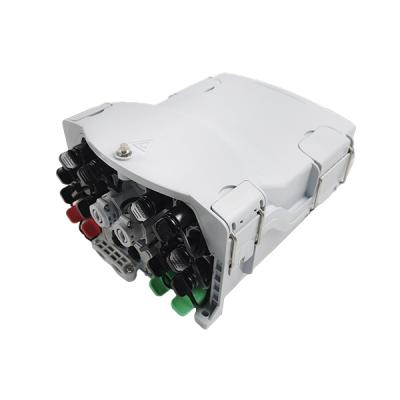
The fiber distribution box (optical distribution frame, ODF, or fiber distribution hub, FDH) branches the backbone network to end-users, housing passive splitters (1:32 or 1:64) for PON and providing interfaces for connectivity. It enables fiber allocation and maintenance, installed in building rooms or pedestals, per ISO/IEC 11801 cabling standards.
HUALUE fiber distribution boxes offer flexible scalability (e.g., up to 72 ports) and ease of maintenance, supporting high-density connections for various environments. These boxes feature a compact design with clear labeling, robust enclosures for physical protection, and compatibility with SC-APC connectors to reduce reflectance. They accommodate PON splitters, ensuring secure transmission in urban high-rises or suburban pedestals.
Deployment Suggestion: Integrate with existing ducts for cost savings; in rural setups, use cascaded splitters to extend reach. Label per ANSI/TIA-606 for troubleshooting, and plan for redundancy to avoid single points of failure.
4. Fiber Optic Wall Outlet: Simplifying User Access and Management


The fiber optic wall outlet (86-type faceplate or customer premises equipment interface) serves as the demarcation point between distribution and premises wiring, enabling easy ONU connection with low-loss terminations.
HUALUE fiber optic wall outlets adhere to high industrial standards like TIA/EIA-568, guaranteeing precise termination with mechanical strength and anti-aging properties. Their sleek design integrates with interiors, supporting SC/APC or LC connectors for efficient insertion/removal and minimal signal degradation (<0.2 dB).
Deployment Suggestion: Install indoors (e.g., garages) for modern homes to reduce exposure; in MDUs, conduct surveys for pathway labeling and use bend-insensitive drops to navigate tight bends without loss.
5. ONU (Optical Network Unit): The Core Device Connecting Users to the Network
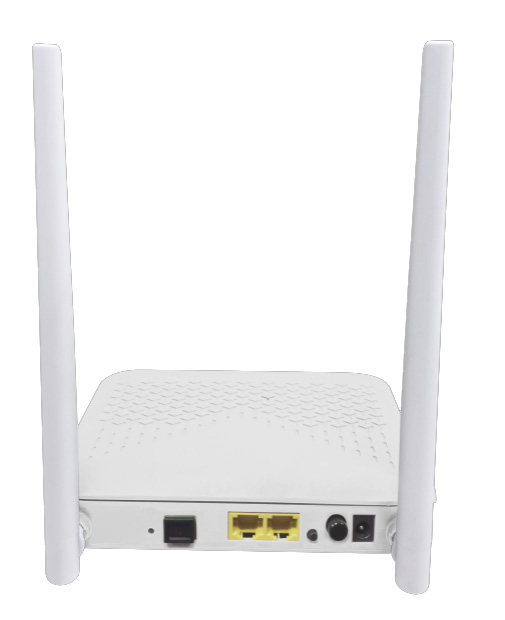
The ONU converts optical signals to electrical for user devices, supporting GPON protocols and interfaces like Gigabit Ethernet or Wi-Fi, installed at premises with OLT coordination.
HUALUE ONUs prioritize stability, compatibility (e.g., TR-069 management), and expandability, featuring low-latency Gigabit ports, 802.11ax Wi-Fi, and VoIP. They suit residential/SOHO needs for 4K/8K streaming and gaming, with intelligent systems for diagnostics.
Deployment Suggestion: Configure via OLT service profiles (VLANs, QoS); test with OTDR for signal quality. Use UPS for power redundancy and monitor via SNMP for ongoing maintenance.
6. Overall Solution Advantages and Deployment Recommendations
Integrating HUALUE products ensures optimized PON performance, compliant with global standards:
High Reliability: Advanced materials per ITU-T and Telcordia for extended life.
Ease of Maintenance and Upgradability: Modular designs for expansions like 10G PON.
Superior Performance: Ultra-high bandwidth and low latency, with loss budgets verified.
Conclusion
FTTH, aligned with standards like ITU-T and best practices from FOA and others, is the preferred broadband technology. By adopting HUALUE's compliant full-link solutions and following these recommendations, deployers can achieve efficient, stable networks, empowering high-speed connectivity in diverse scenarios.
Note on Generating Word Document: Copy the above content into a Microsoft Word document. The images are embedded via URLs (publicly available from sources like Unsplash and ResearchGate for illustrative purposes; replace with HUALUE-specific images if available from their site). In Word, right-click any broken image placeholder and select 'Change Picture' to insert from the URL if needed. For a professional layout, use Word's 'Insert > Pictures > From Online' feature to add them directly. If you need a downloadable file, save this as HTML first (paste into a .html file) and open in Word to convert.
Author:
HUALUE CO.,Limited









